VFX Flow
A production pipeline toolkit and automated quality gatekeeper engineered to prevent asset submission errors, protect shared game repositories, and accelerate daily artist workflows.
- Role
- VFX Technical Artist / Pipeline Tool Developer
- Production Target
- Confidential AAA Action Title (PROJECT-TITAN)
- Built with
- PowerShell 5.1, WPF (XAML), Python, Perforce CLI, Task Scheduler
Reduced from ~15 min manual verification
Guards core /fx_library/ from rogue check-ins
Scheduled Perforce backup of active changelists
Naming, paths, texture formats & asset limits
Production Context
Why 6 PM submissions break AAA builds
In high-velocity AAA development, artists work up to the deadline before committing large changelists to Perforce. With dozens of interrelated files (.visualeffect, .material, .texture, .model), manual checks fail under pressure.
Naming & Syntax Errors
Forbidden substrings like '_vfx' or incorrect texture suffixes break automated build packaging.
Shared Library Regressions
Accidental check-ins to common /fx_library/ files silently break assets across the entire studio.
Uncommitted WIP Loss
Unshelved local experiments risk corruption or accidental overwrites during daily mainline syncs.
Automated Asset QC & Readiness Gate
A static analysis engine scans authored files before any changelist can be created. Try toggling the interactive gate below to inspect how violations are caught and resolved.
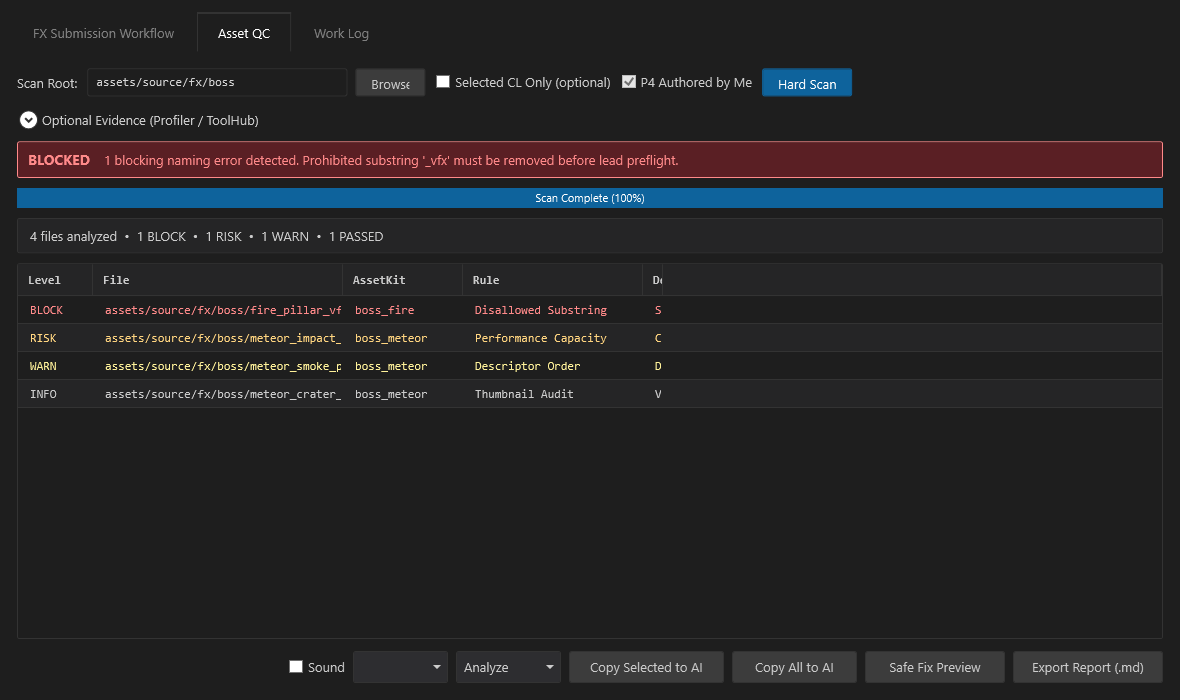
The automated scan flagged a disallowed _vfx substring in fire_pillar_vfx, and marked particle capacity at RISK (>30k budget). The tool locks the changelist creation button until naming errors are resolved, preventing bad commits from reaching the Perforce mainline.
8-Rule Validation Engine
Enforces strict lowercase tokens, forbidden substring filters (_vfx, _fx, _gp), map suffixes (_c, _n, _g, _m), and VFX descriptor hierarchies.
Particle Budget Heuristics
Parses particle system capacities and flags configurations exceeding 30,000 particles before runtime profiling to prevent catastrophic overdraw spikes.
Integrity & AssetKit Audits
Verifies mandatory .thumbnail presence for all materials and effects, ensuring assets never ship with missing editor icons or broken AssetKit links.
Command-Driven Work Log & Rollover Engine
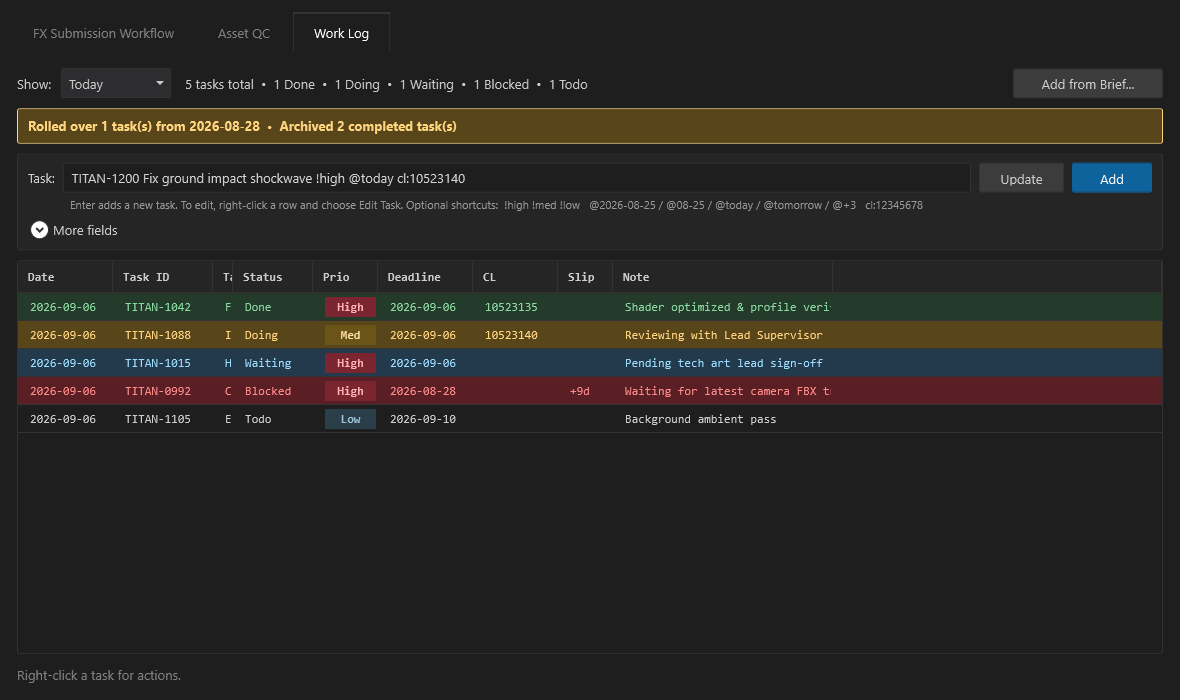
Context-switching between Jira, Perforce, and DCC viewports slows artists down. VFX Flow provides an ultra-fast inline terminal interface for tracking daily production beats.
- Inline Shorthand: Fast input supporting tags like
!high,@today, andcl:10523140. - Task Rollover: Incomplete tasks automatically move to the next day with a slip-day counter (
+9d). - Brief PDF Parser: Uses PyMuPDF to extract task names, due dates, and review notes directly from review briefs.
Perforce Automation & Shared Library Guard
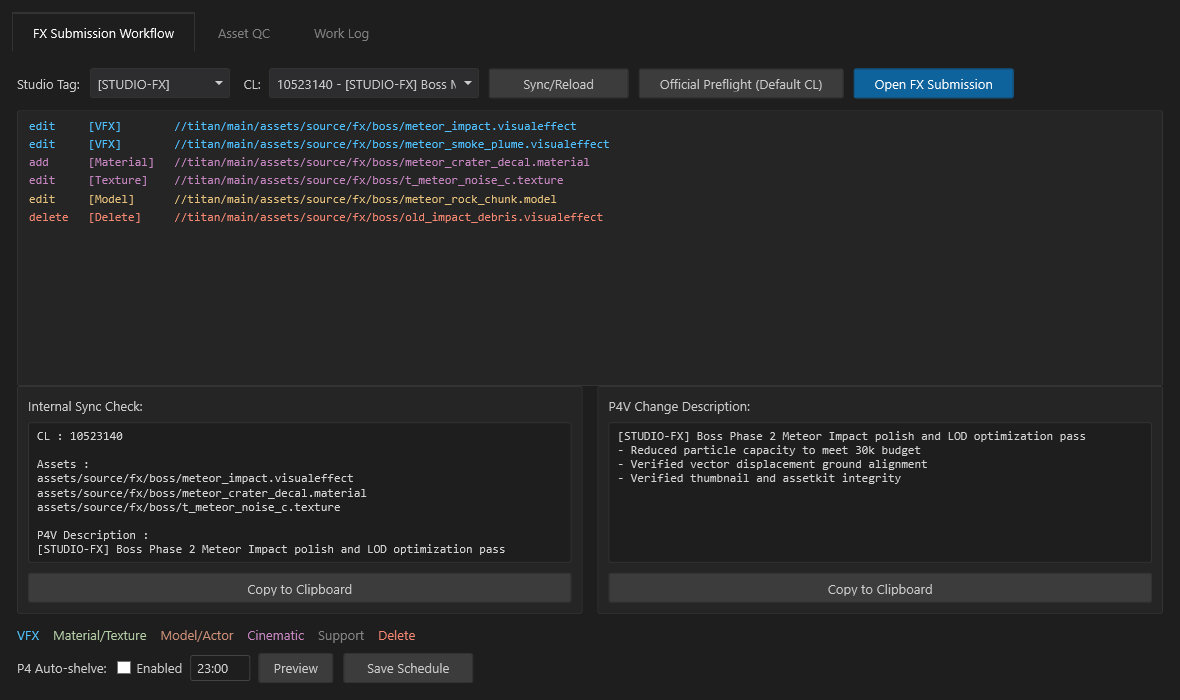
Writing accurate changelist descriptions and sorting asset dependencies by hand is prone to oversight. VFX Flow automates the entire Perforce staging pass.
Shared Library Protection Gate
Intercepts changelists touching common directories like /fx_library/ or /shared/, locking submission until an explicit supervisor override is granted.
Dual-Format Description Generator
Produces synchronized internal sync check blocks for lead reviews alongside formal bulleted descriptions for formal Perforce P4V changelist commits with one click.
Automated Nightly Shelve at 23:00
A background Windows Task Scheduler passes checked-out assets into a pending shelf every night without reverting local changes, providing an automated safety net against lost work.
Engineering
Technical decisions
Multi-Threaded Runspaces for Responsive UI
Perforce CLI queries and regex file scans can block the main application thread on large workspaces. I designed the backend using isolated PowerShell Runspaces, offloading heavy I/O operations asynchronously so the XAML WPF interface remains responsive without UI freezing during large directory queries.
Asset-Only Sandboxing Boundary
The tool operates strictly in user-space without requiring administrative privileges or intrusive daemons. It interacts purely through standard Perforce CLI wrappers, ensuring safe, frictionless deployment on production workstations.
Confidentiality & NDA Sanitization
Built and verified in real production at Sparx* for a confidential AAA action-adventure project. All depot paths, client identifiers, and project codenames in this showcase have been sanitized to PROJECT-TITAN and [STUDIO-FX] in full accordance with client non-disclosure agreements.